

 The 2026 Drupal Business Survey is open. Your response will help shape the future of the Drupal business ecosystem.
The CSS in Drupal 7's Vertical Tabs (#323112: Vertical Tabs now part of core, woohoo!) is much better than what we're currently using. It should solve several problems including:
#453884: Invisible left border.
#427938: Vertical Tabs container should resize if .vertical-tabs-list height changes
#398048: IE (6) layout broken
#357142: Some padding in body text
Not only that, but the core CSS was extensively tested on IE 6/7/8, Opera, Firefox, Safari. It's generally better and more flexible, plus we can simultaneously fix problems in core and benefit from improvements to the core version by making the two version use the same markup and CSS.
This patch makes Vertical Tabs use identical markup and CSS to the Drupal 7 version.
| Comment | File | Size | Author |
|---|---|---|---|
| #2 | ie7_problem.jpg | 14.37 KB | atelier |
| vertical_tabs_css_backport.patch | 11.74 KB | quicksketch |

Comments
Comment #1
quicksketchCommitted so we can get this version out and get some new testers on it.
Comment #2
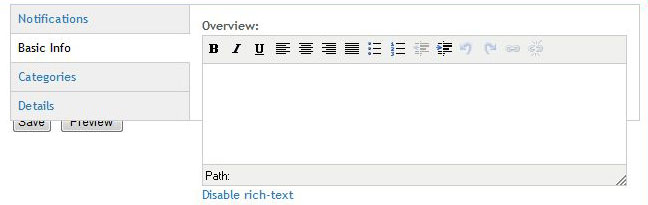
atelier commentedI installed the 2009-05-18 dev build, but I'm still having a problem in IE7. Works fine in FF3. (See attached)
Comment #3
quicksketchHm odd, did you clear your caches so that the new CSS is in place? Is the problem specific to tinyMCE text editors, or does this happen in every tab?
Comment #4
quicksketchatelier, let's continue in a new issue: #467204: IE7 Content Overflows
Comment #6
Anonymous (not verified) commentedTested the D7 patch with a few themes (latest D7 versions).
Bartic, Corolla, Garland, MAYO, Nitobe, Picture reladet (AT), Seven, Sky, Typebased: succesfull.
With the theme BlogBuzz II http://drupal.org/project/blogbuzz there is an error on page admin/appearance/settings/blogbuzz.
The vertical tab is generated in this page.
Could be a BligBuzz issue?